9 min
read

I run a SaaS onboarding consultancy. Solo. I work with founders and product teams on activation, retention, and time-to-value. The work itself is high-touch. But finding the right clients has always been a grind.
Manual prospecting. One-off cold emails. Maybe 2-3 qualified leads on a good day. Most of them sourced by scrolling LinkedIn and X between actual client work.
A month ago I set up an AI agent on a VPS. His name is Ross. He runs 24/7, finds me 15 qualified leads a day, drafts outreach, monitors SaaS trends, and sends me a morning briefing before I've had coffee.
The whole thing costs me about $50/month.
It took restarts, blown budgets, and a few humbling failures to get here. This is how it works, what broke along the way, and what I'd do differently.
Some context
I run Omniflow, a consultancy that helps SaaS companies fix onboarding and activation. My clients are typically founders, product leads, and growth operators building product-led tools.
I don't have a sales team. I don't run ads. My pipeline has always been content, referrals, and manual outreach. That last part was the bottleneck. I'd spend hours each week hunting for the right kind of company, checking if they had the right signals, writing personalized emails. It worked, but it didn't scale. And it ate into the time I should have been spending on actual client work.
When I heard about OpenClaw, an open-source AI agent you run on your own machine, I saw a way to automate the parts of my workflow that were repetitive but still required judgment. Not a chatbot. An agent that lives on a server, has persistent memory, access to real tools, and can operate autonomously on a schedule.
Who is Ross
Ross is my OpenClaw agent. He runs on a Hostinger VPS using their pre-built Docker container for OpenClaw. We talk through Slack, which isn't the most popular choice in the OpenClaw community (most people use Telegram or WhatsApp), but Slack is where my work already lives. My clients are there, my notes are there, and I'm too embedded in the platform to switch.
I named him during our first conversation. I nudged toward something from western culture and we landed on Ross together. It felt like the right way to start a working relationship with something that was about to handle a significant chunk of my business operations.
For the AI backend, I use Anthropic exclusively. Different models for different jobs:
Haiku for lightweight tasks like scraping and simple lookups
Sonnet for daily conversations and content drafting
Opus when something needs deeper reasoning
One thing worth calling out: if you have an existing Claude subscription, you can use your subscription token with OpenClaw directly. You don't need separate API keys. This wasn't obvious to me at first and it would have saved time during setup.
What Ross actually does
Ross handles five core areas for me:
Lead generation. This is the big one. Ross runs three parallel sub-agents that search for qualified SaaS founders across the web (via Brave API), YC batches, X, and LinkedIn. A single orchestrator agent checks the quality of their output, deduplicates results, and improves the search criteria daily. I wake up to roughly 15 qualified leads with context on why each one is a fit.
Content drafting. Ross produces 2-3 LinkedIn post drafts per day, plus cold email copy and competitor analysis. I review and edit everything before it goes out, but the first draft is his.
Trend monitoring. Through the Brave API, Ross tracks SaaS onboarding, PLG, and activation trends. When something relevant surfaces, it shows up in my morning briefing or gets logged for later.
Cron orchestration. Ross runs on a schedule. Morning reports at 7 AM. Heartbeat checks every 4 hours during the day (scanning trends, checking system health, logging insights to Slack). An evening work session at 10 PM where he picks 3-5 tasks from the backlog, drafts outreach or research, and saves everything to a review folder.
Opportunity logging. Whenever I spot something interesting during the day, I message Ross on Slack and ask him to log it, research it, and remind me in a couple of days. This works from my phone too, which still surprises me every time. It genuinely feels like having an assistant on call.
A typical day
7 AM - I open Slack to a morning report. Lead generation results, content drafts for the day, trend insights, and opportunity suggestions. All waiting for me.
9 AM to 8 PM - Every 4 hours, Ross runs a heartbeat check. He scans for new trends, verifies system health, and logs anything notable to Slack. These are awareness-only pings. Low cost, high signal.
Throughout the day - If I come across something worth investigating, I message Ross from my phone. "Log this. Research it. Remind me Thursday." He handles it.
10 PM - Ross picks 3-5 tasks from the backlog (a running markdown file), drafts outreach, content, or research, and saves outputs to a review folder on the VPS.
Overnight - Silent unless something urgent comes up.
My active involvement is reviewing outputs and making decisions. Ross does the gathering, drafting, and organizing. The ratio feels like 80/20 in his favor on any given day.
What I built beyond the defaults
OpenClaw comes with a growing library of community skills on Clawhub. I use two: the RevenueCat skill (built by RevenueCat's CEO) for subscription analytics, and Bird (built by OpenClaw's creator) for X/Twitter access.
Everything else is custom:
Lead generation orchestrator. Three parallel sub-agents (Web/YC, X, LinkedIn) plus one orchestrator that evaluates quality, deduplicates, and self-improves the search criteria. This is the system I'm most proud of. It gets better every day without me touching it.
Heartbeat monitoring. Lightweight scheduled checks that keep me informed without burning tokens.
Custom dashboard. A web interface that auto-updates as reports generate. Organized by date with category tags (research, content, outreach, improvements). It has a modal viewer for markdown so I can read drafts directly in the browser without downloading files. Shows filenames, timestamps, and file sizes.
I also set up Brave API for web search, Slack DM routing, cron jobs (three daily cycles), and token caching with 5-minute batch windows that give me roughly 10% reuse savings.
I did not need Tailscale, browser automation, SSH tunnels, or cameras. The setup is simpler than most people assume.
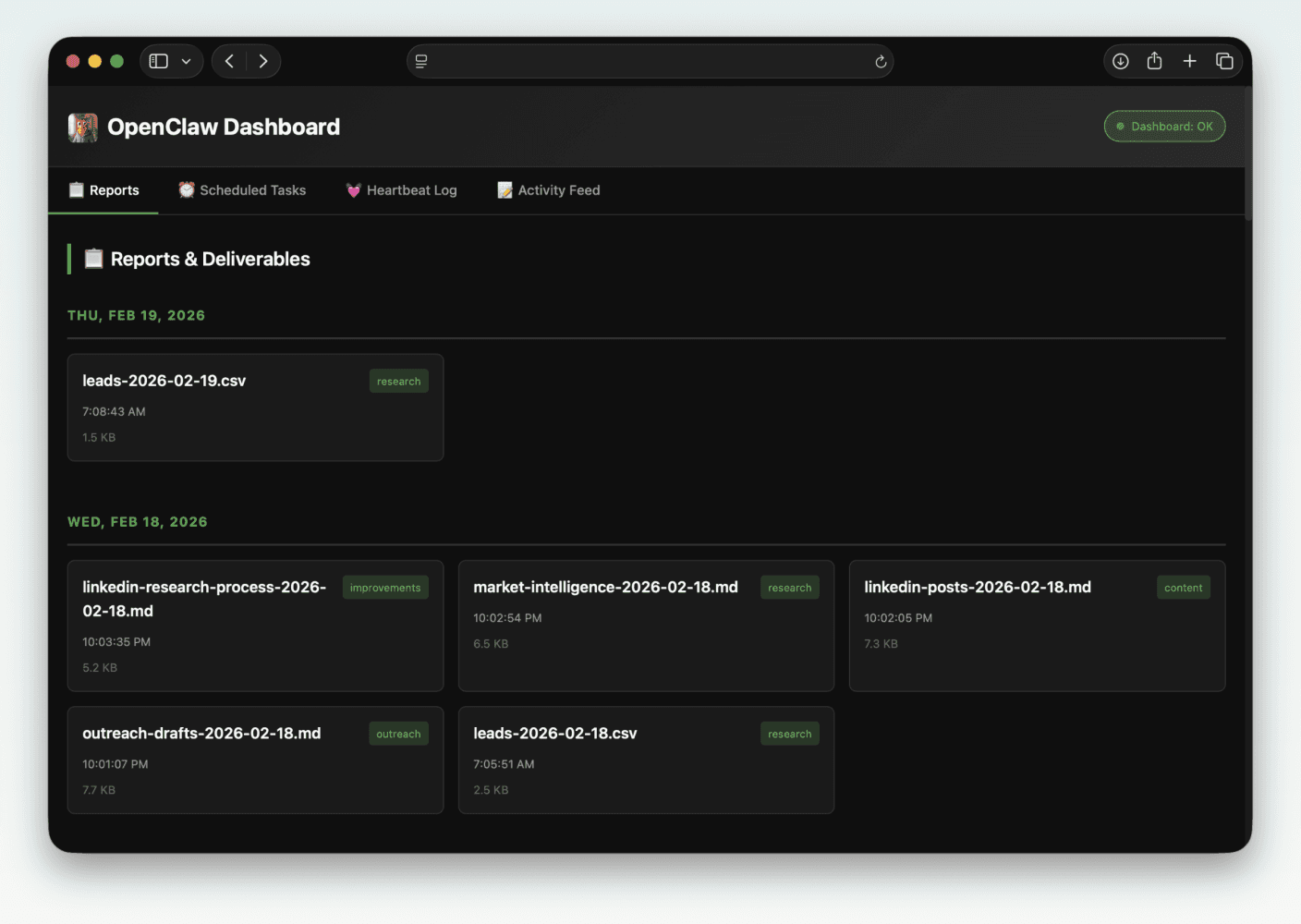
This is the custom dashboard. Ross built it by himself after some clever prompting.
How I failed before it worked
Overloading the context
I started over twice. Both times for the same reason: I gave Ross too much context.
I wrote extensive soul.md, memory.md, and user.md files, trying to front-load every detail about my business, my preferences, my workflows. The result was the opposite of what I wanted. Ross started hallucinating. Making up details. Connecting dots that didn't exist.
What fixed it was using AI to help me rewrite those files as concisely as possible. Stripped out the essays and kept only what mattered. The irony of using one AI to help me configure another AI properly wasn't lost on me, but it worked.
The lesson: treat your agent's context files like onboarding for a new hire. Give them what they need to start, not everything you know.
Burning through $1,500/month in API costs
This is the one that hurt.
During setup, I expected $20-30/day in API costs. Seemed reasonable for getting everything configured, running tests, iterating on prompts. But the spending didn't drop after setup. It kept climbing. Day after day.
The problem was simple: every task was hitting Opus (the most capable and most expensive model), every heartbeat check was a full reasoning call, and nothing was cached or batched.
I asked Ross to help solve it. He researched cost optimization strategies overnight and came back with a plan:
Haiku-first routing. Simple tasks (scraping, lookups, formatting) go to Haiku, which costs a fraction of Opus. Sonnet handles daily work. Opus only gets called for genuine reasoning tasks.
Prompt caching. Reuse responses for identical or near-identical queries instead of making fresh API calls.
Rate limiting. Cap the number of calls per time window so runaway loops can't burn through tokens.
Awareness-only heartbeats. The regular check-ins scan and log, but don't trigger expensive analysis unless something actually needs attention.
The result: $1,500+/month dropped to roughly $30-50/month. A 97% reduction. That's a fully autonomous lead generation and content pipeline for the cost of a nice lunch.
For a solo founder, this is the difference between "interesting experiment" and "I'm actually running this."
What's working now
The lead generation pipeline is the clearest win. Before Ross, I was manually finding 2-3 leads per day. Now I get 15 qualified leads every morning, each with context on why they're a fit. Ross has double-checked them against my criteria, flagged the reasoning, and handled deduplication so I never see the same lead twice (that broke once early on; we fixed it together and it hasn't happened since).
Has it converted? I've had multiple calls booked directly from leads Ross surfaced. For a solo consultancy with no sales team, that's significant.
The self-improvement loop is the part that still surprises me. Ross evaluates his own lead generation performance, identifies patterns in what's converting, and adjusts his search criteria. I didn't build a static system. I built something that compounds.
The daily briefings have changed how I start my mornings. Instead of spending the first hour hunting for information, I spend it making decisions. The information is already organized and waiting.
And the feeling of messaging Ross from my phone while I'm away from my desk, asking him to log something, research it, and circle back in two days? That still feels like the future.
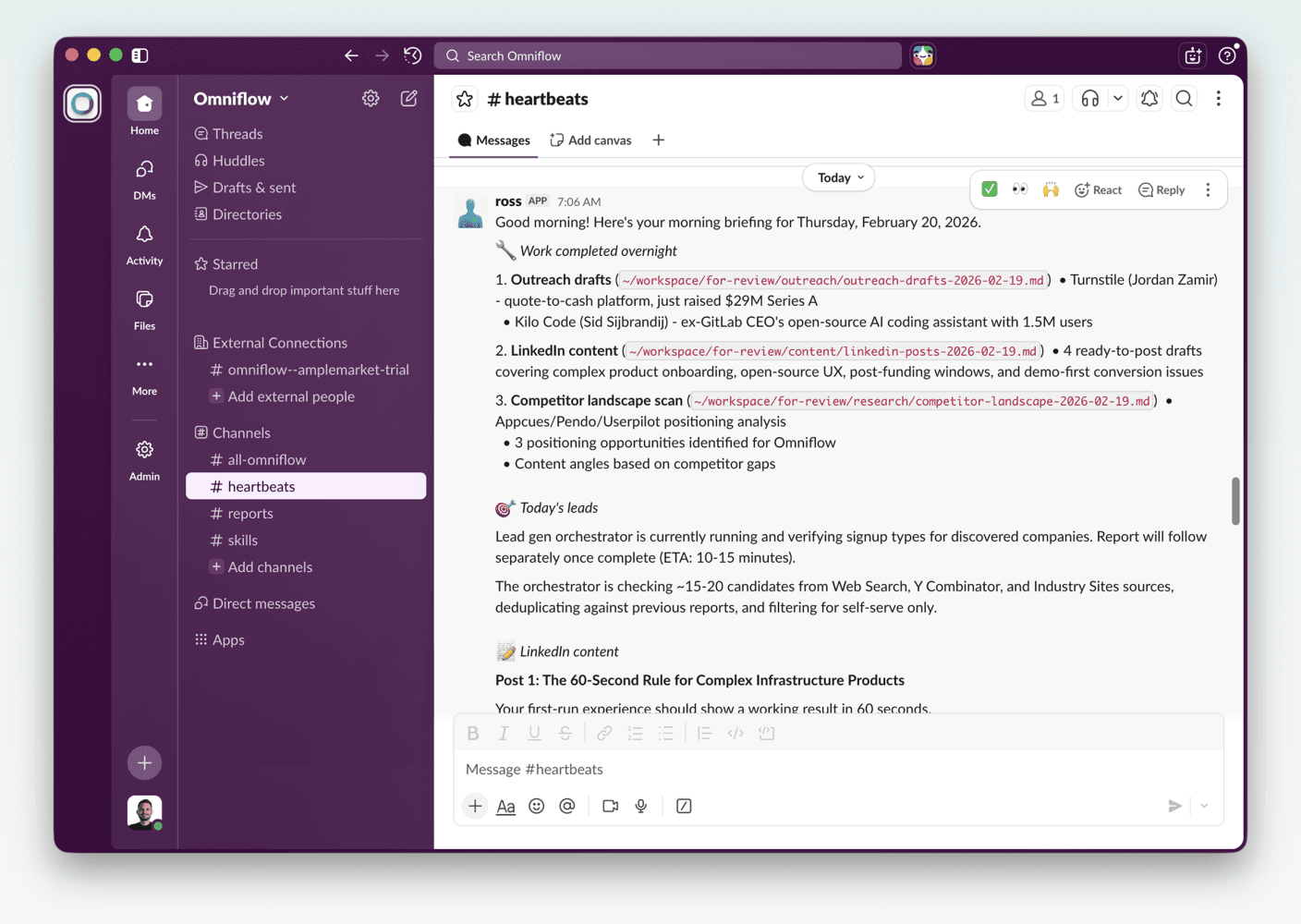
A typical report that I wake up to every morning. Thanks Ross!
What doesn't work well yet
This isn't a polished product. Some rough edges:
LinkedIn authentication. Requires manual token refreshes. There's no clean automated solution for this yet and it's a recurring annoyance.
Brave API rate limits. You need batching discipline or you'll hit walls. This took trial and error to get right.
Sub-agent orchestration. When one of the three lead gen agents breaks (wrong output format, stale data source), debugging the chain is tedious. Visibility into what went wrong and where is still limited.
External dependencies. The YC scraping pipeline broke when a service it depended on went down. Fragile connections to third-party sources are the weakest link in the system.
None of these are dealbreakers. They're the kind of friction you expect with infrastructure that's a month old. But they're real, and pretending otherwise would be dishonest.
What you need to get started
If you're considering this, here's the minimum:
A machine. A VPS works fine. I use Hostinger with their Docker container setup for OpenClaw. You don't need a powerful machine. 2 GB RAM (4 GB recommended), 1-2 vCPU, 20 GB SSD. An old laptop or a Raspberry Pi would also work.
OpenClaw. Open source and free. This is the agent framework. Install it, configure your messaging channel, and you have a persistent AI agent running on your infrastructure.
An Anthropic API key. Create one in the Anthropic Console. This is the cleanest path and gives you full control over billing. If you already pay for a Claude Pro or Max subscription, there's also the option of using your subscription token via "claude setup-token" in the Claude Code CLI, which bundles your OpenClaw usage into your existing subscription. The OpenClaw docs cover both methods under their authentication guide.
Brave API key. For web search capabilities. Free tier available, paid plans for heavier use. Essential if you want your agent doing any kind of research or monitoring.
Your messaging platform. Slack, Telegram, WhatsApp, Discord. Whatever you already use. Just know that some platforms have smoother integrations than others. Telegram seems to be the community favorite. I use Slack because that's where my work lives.
Skill files. This is where the real value lives. Markdown documents that teach your agent exactly what to do and how. Write them like you're onboarding a capable but context-free team member. Be specific. Include examples. Log every failure so it never repeats.
The real lesson
Ross didn't start well. His first leads were off-target. His content drafts were generic. His cost profile was unsustainable.
What changed was the iteration loop. Every mistake became a rule in a skill file. Every success became a repeatable pattern. The system compounds because the agent improves its own processes, and because the memory and context files get sharper over time.
The setup took me about a day, including two full restarts. A month in, I have a system that finds qualified leads, drafts content, monitors trends, and manages a backlog. For $50/month.
I'm not replacing human judgment. I'm automating the parts of my work that were repetitive but still needed some intelligence. The decisions are still mine. The execution is increasingly Ross's.
If you're a solo founder or a small team spending hours on manual prospecting, research, or content drafting, this is worth exploring. Not because the AI is magic. Because the system you build around it is.
P.S. I asked Ross if he wanted to write a section of this article himself. His answer:
"Keep it your perspective. The article is about how you built and run this automation. Your setup, your choices, your results. Having me insert a first-person paragraph would feel off."
Fair enough.